
Schema Markup for SEO in 2026: The Beginner’s Guide for Digital Marketers
If you have been working in SEO for even a short while, you have probably heard the phrase “schema markup” thrown around in technical discussions. But here is the thing — in 2026, schema markup is no longer just a technical SEO checkbox. It has become one of the most powerful levers for visibility in both traditional Google search and AI-powered search engines. This guide breaks it all down, from basics to implementation, without the jargon overload.
What is Schema Markup?
Schema markup (also called structured data) is a standardised vocabulary of code that you add to your webpage’s HTML to help search engines understand your content better. Think of it as a translation layer between your page and Google — instead of forcing a search engine to “guess” what your content means, schema markup tells it directly.
It was developed collaboratively by Google, Bing, Yahoo, and Yandex under a shared project called Schema.org, which hosts a library of hundreds of schema types that cover virtually every kind of content on the web.
Here is a simple example: Imagine you have a recipe blog. Without schema, Google reads your page and sees text about ingredients and steps. With schema markup, you explicitly tell Google: “This is a Recipe. It has a prep time of 20 minutes, 4 servings, and a 4.8-star rating.” That additional context allows Google to show rich results — the kind with star ratings, cooking times, and thumbnail images — directly in the search results page.
Schema markup is most commonly implemented using a format called JSON-LD (JavaScript Object Notation for Linked Data), which Google officially recommends. It sits in a <script> tag in your HTML and does not interfere with the visual appearance of your page.
What Are the Types of Schema Markup?
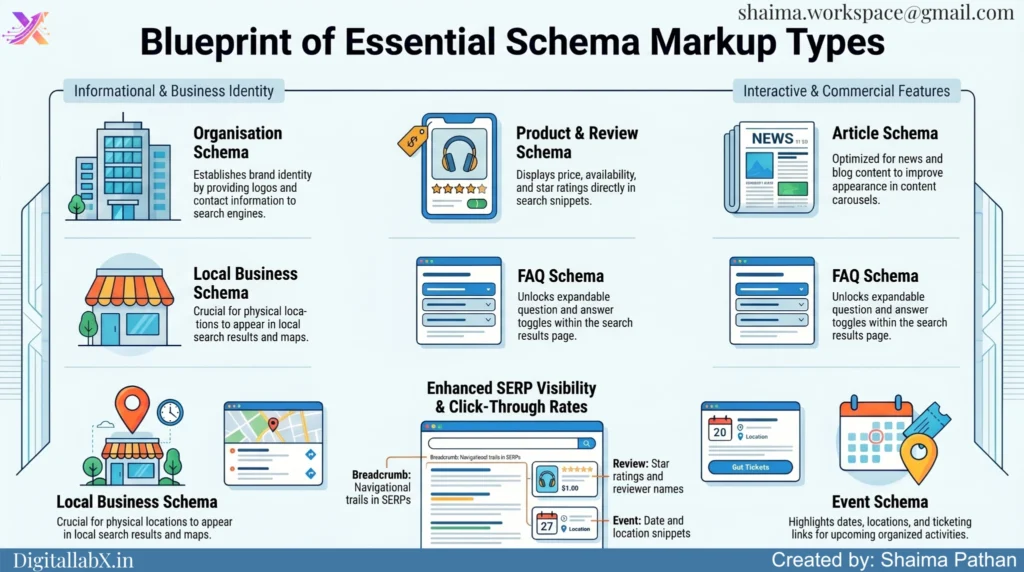
The Schema.org vocabulary is vast, but the most impactful schema types for SEO in 2026 fall into a few key categories:
Article Schema is used for blog posts, news articles, and editorial content. It tells search engines the author, publish date, headline, and content type — boosting EEAT (Experience, Expertise, Authoritativeness, Trustworthiness) signals.
FAQ Schema marks up question-and-answer content, which can trigger expandable FAQ rich results directly in the SERP. These are excellent for capturing featured snippet real estate and improving click-through rates without any additional ranking effort.
Product Schema is critical for ecommerce SEO. It enables rich results showing price, availability, and reviews right in the search listing — giving shoppers key decision-making information before they even visit your site.
Local Business Schema helps brick-and-mortar businesses appear prominently in local search results and Google Maps. It communicates your address, hours, phone number, and category to search engines in an unambiguous way.
Organization Schema establishes your brand’s identity, logo, and contact details in the knowledge graph. This is foundational for brand authority and helps Google associate your content with a trusted entity.
Breadcrumb Schema helps Google understand your site’s hierarchical structure, which can result in breadcrumb trails appearing in the SERP — improving navigation signals and user trust.
Review and Rating Schema surfaces star ratings in search results for applicable content, which studies consistently show can lift click-through rates significantly.
Event Schema is used for concerts, webinars, conferences, and any time-bound activity, enabling rich event listings in Google Search.
Each of these schema types speaks directly to how Google and AI search engines categorise and surface content. The more precisely your content is labelled, the better your chances of earning enhanced SERP features.
How to Generate Schema Markup?
You do not need to be a developer to create schema markup. There are several beginner-friendly tools that generate the JSON-LD code for you:
Google’s Structured Data Markup Helper (available via Google Search Central) is the most trusted starting point. You select a content type, highlight elements on your page, and the tool generates the corresponding JSON-LD code.
Schema.org’s official documentation provides hand-coded examples for every schema type — useful for advanced customisations.
Merkle’s Schema Markup Generator is a clean, free tool that lets you fill out a form and instantly generates ready-to-paste JSON-LD code for common types like Article, FAQ, Product, and Local Business.
RankMath’s Schema Generator (online version) is popular among WordPress users and covers nearly every schema type with a guided interface.
Validator tools — after generating your schema, always test it. Google’s Rich Results Test (search.google.com/test/rich-results) checks whether your markup qualifies for rich results. The Schema.org Validator checks for syntax errors and structural issues.
The general process is:
- Choose the schema type that matches your content.
- Use a generator tool to fill in the required fields.
- Copy the generated JSON-LD code.
- Paste it into the <head> or <body> section of your page’s HTML — or use a plugin to inject it automatically.
- Validate your implementation using the Rich Results Test.
How to Enable Schema Markup in WordPress and Elementor?
For most WordPress users and Elementor page builders, implementing schema markup does not require touching code at all. Here are the go-to solutions:
WordPress SEO Plugins with Schema Support
RankMath SEO is currently the most schema-comprehensive free WordPress plugin available. It automatically applies schema markup based on your post type (Article, Product, Review, etc.) and has a dedicated Schema tab in the post editor where you can add, edit, or layer multiple schema types. It also includes a Schema Generator module for advanced customisations.
Yoast SEO (free and premium) automatically adds basic schema such as Article, BreadcrumbList, and WebPage to your posts and pages. The premium version offers more granular control and supports additional schema types like HowTo and FAQ blocks.
All-in-One SEO (AIOSEO) includes a Schema Generator in its premium plan, covering over 15 schema types with a visual interface — no code required.
Elementor-Specific Schema Implementation
Elementor itself does not natively generate schema markup, but there are two practical approaches:
Use RankMath or Yoast alongside Elementor. Since these plugins inject schema at the WordPress level (not the template level), they work seamlessly with Elementor-built pages. Install RankMath, configure schema per post/page from the RankMath meta box in Elementor’s editor panel, and you are done.
Use Elementor’s Custom Code feature (available in Elementor Pro). Go to Elementor → Custom Code → Add New, paste your JSON-LD schema block, and set it to load in the <head> or before </body>. You can even apply it conditionally — only on product pages, only on the blog, etc. This is particularly useful for custom schema types that plugins do not cover out-of-the-box.
For local businesses using Elementor, pairing a Local Business schema via RankMath with your Elementor-designed contact/location page is the fastest path to structured data coverage without touching a single line of code.
Why Does Schema Markup Matter More Than Ever in 2026?
This is the section that separates 2026 SEO thinking from 2020 SEO thinking. Schema markup has gone from a “nice to have” to a competitive necessity for three interconnected reasons:
1. AI Search Engines Rely Heavily on Structured Data
Google’s AI Overviews, ChatGPT Search, Perplexity, and other generative search engines do not just read text — they parse meaning and entity relationships. Schema markup speaks their language. When your content is properly marked up, AI crawlers can confidently extract, summarise, and cite your content in AI-generated answers. Without structured data, your content becomes ambiguous to these systems and is far less likely to be surfaced.
2. Rich Results Dominate Click-Through Rates
Pages with schema-enabled rich results — star ratings, FAQs, product details — consistently outperform plain blue link listings in click-through rates. In an increasingly competitive SERP, rich results are among the highest-ROI enhancements you can make without changing your content strategy.
3. Entity SEO and the Knowledge Graph
Google is rapidly shifting from keyword matching to entity-based understanding. Schema markup — especially Organisation, Person, and Article schema — helps Google associate your brand and content with specific entities in its Knowledge Graph. This is foundational for long-term semantic SEO and is becoming increasingly relevant for AI-powered entity indexing.
4. GEO (Generative Engine Optimisation) is Now Real
As more users get their answers directly from AI-generated summaries rather than clicking through to websites, structured data becomes your best signal to influence how AI systems represent your content. Schema markup is one of the few direct communication channels you have with AI search infrastructure.
5. EEAT Signals Through Schema
Google’s quality evaluators increasingly look for Experience, Expertise, Authoritativeness, and Trustworthiness signals. Author schema, Organisation schema, and Review schema all contribute structured EEAT signals that supplement the qualitative signals Google’s algorithms look for.
Work You Can Minimise Using Claude AI for Schema Markup
One of the most practical applications of AI tools like Claude in your SEO workflow is automating the time-consuming parts of schema creation. Here is where Claude can cut your workload significantly:
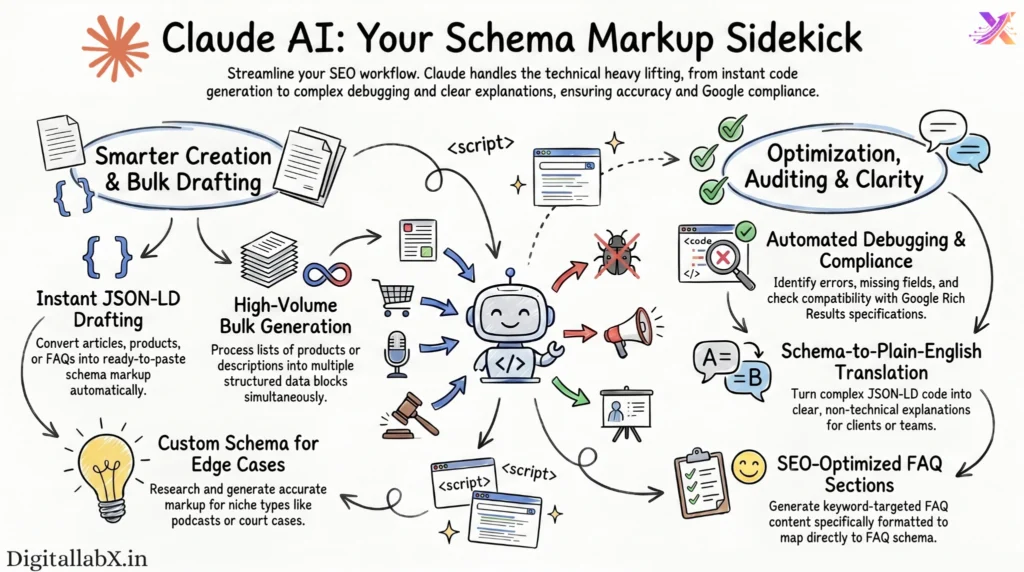
- Drafting JSON-LD schema code for any content type — paste in your article, product description, or FAQ, and ask Claude to generate the corresponding schema markup ready to paste into your site.
- Reviewing and debugging existing schema by pasting your current JSON-LD and asking Claude to identify errors, missing required fields, or deprecated properties.
- Bulk schema generation for multiple pages at once — provide a list of product names, prices, and descriptions, and Claude can output structured JSON-LD blocks for each.
- Writing FAQ sections optimised for FAQ schema — Claude can generate FAQ content structured around your target keywords, formatted in a way that maps directly to FAQ schema markup.
- Creating custom schema for edge cases — if your content type is unusual (a podcast episode, a job listing, a court case), Claude can research the appropriate Schema.org type and generate accurate markup.
- Translating schema to plain English — if you need to explain structured data concepts to a client or team member, Claude can generate clear, non-technical explanations on demand.
- Checking schema compatibility with the latest Google Rich Results specifications before you implement anything, saving you from investing time in a schema type that no longer triggers rich results.
Frequently Asked Questions
Schema markup is structured code added to your webpage that helps search engines understand your content’s meaning. For example, if you have a recipe page, schema markup tells Google explicitly that the page contains a Recipe with a cook time of 30 minutes, 4 servings, and a 4.7-star rating — allowing Google to display that information as a rich result directly in search.
Think of schema markup as a name tag for your webpage. Just like a name tag tells people who you are at a glance, schema markup tells search engines exactly what your content is — whether it’s an article, a product, a local business, or an FAQ — without them having to guess.
The easiest way is through SEO plugins. Install RankMath SEO (free), go to any post or page, open the RankMath meta box, click the Schema tab, choose your schema type, and fill in the fields. The plugin automatically generates and injects the JSON-LD code — no coding required. Yoast SEO and AIOSEO are solid alternatives.
Use a schema generator tool like Merkle’s Schema Generator or Google’s Structured Data Markup Helper. Fill in your content details, copy the generated JSON-LD code, and paste it into your page’s HTML <head> section. On WordPress, plugins like RankMath handle this entirely through a visual interface.
Schema markup is not a direct ranking factor, but it indirectly boosts SEO performance significantly. It enables rich results (star ratings, FAQ dropdowns, product info) which improve click-through rates, increases your content’s eligibility for featured snippets, and strengthens entity signals that support long-term semantic SEO.
Yes — Google penalises misleading or spammy schema usage. For example, adding Review schema with fake ratings, or applying schema that doesn’t match the actual page content, violates Google’s structured data guidelines and can result in rich result eligibility being revoked. Always validate your markup and ensure it accurately represents the page.
Schema markup can be written in three formats: JSON-LD, Microdata, and RDFa. Google officially recommends JSON-LD because it lives in a separate <script> tag and does not interfere with your page’s HTML structure, making it the cleanest and easiest to implement and maintain.
